Webflow’s pricing is known to cause confusion, second-guessing, and ghost invoices; particularly if users sign up for a plan without reading the fine print. On September 22nd, 2022, Webflow updated their pricing to an increased cost for all Site Plans.
Webflow’s pricing is known to cause confusion, second-guessing, and ghost invoices; particularly if users sign up for a plan without reading the fine print. On September 22nd, 2022, Webflow updated their pricing to an increased cost for all Site Plans. So, let’s dive into the changes and what you can do if you are looking to host your site on Webflow or if you currently have a site and want to ensure your business chooses the right option.
Before we cover all the insights, we want to state that all existing Webflow plans are locked into their existing pricing for one year, starting September 22nd, 2022; regardless of whether you’re on an annual subscription or a monthly subscription. If you open a site anytime past September 22nd, you will see and subscribe to the pricing noted within this article.
(Updated February 7th, 2023)
Webflow Pricing Offers
If we had to choose one area that causes the most confusion for new Webflow customers, it’s definitely the difference between a site plan and an account plan, now called “workspaces,” and why they differ.
From a high level, a site plan is charged for one specific website and allows you to host your site on a custom domain. An account plan or workspace allows you to build more than one site using the same account.
DLDR; If you plan on hosting one site on Webflow, select the right Site Plan for your site’s needs. However, if you are an agency or business with many brands, you will want to explore the Workspaces options. Which option is the best? Keep reading for more!
Webflow Workspaces (Account Plans)
One misunderstanding about account plans is that they are required to host a Webflow site. Although this is correct, the vast majority of website owners will only know that they need a workspace plan once Webflow locks them out of their old or secondary sites. Therefore, account plans are indeed for freelancers, agencies, or brands that need to save more than two sites within the same account.
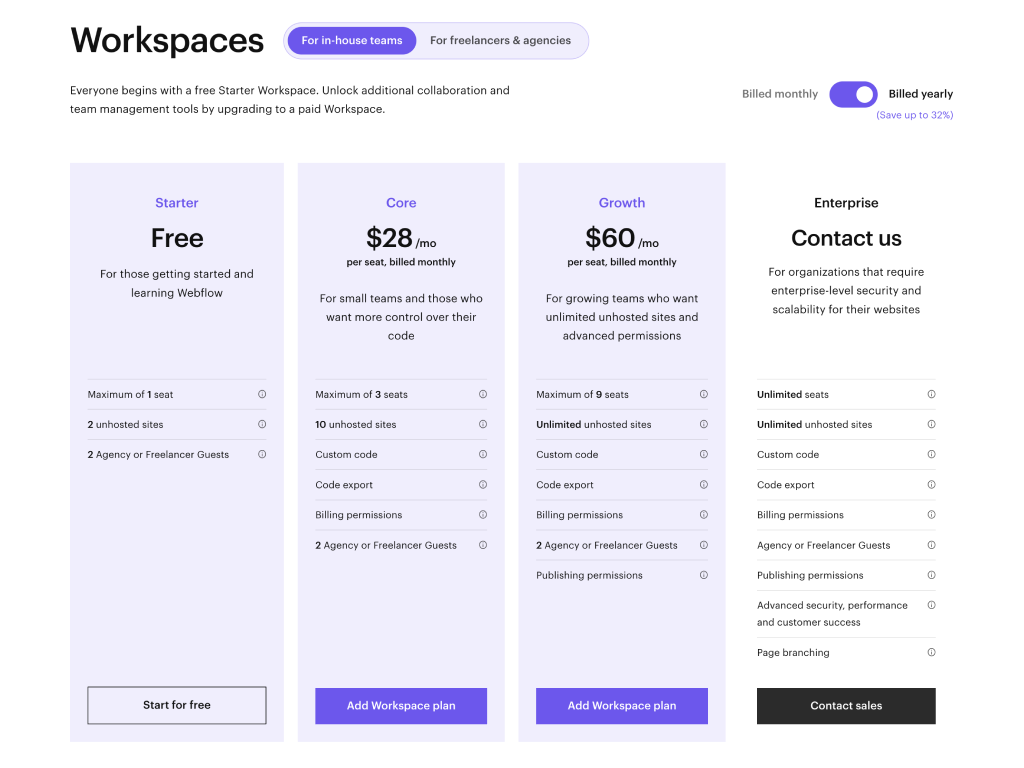
Webflow offers three (3) workspace offers, but all of the following items are included with every Webflow workspace plan:
Unhosted sites on free webflow.io domains
Guest access (new feature!)
Site transfers
All of Webflow’s interaction and animation tools
Customized client billing
Drag-and-drop no-code development tools
Let’s explore each of the 3 workplace offerings:
If you host an internal team or own one business with many brands:
The “in-house” workspace options are primarily for businesses who want more control over their website’s design and development. These plans are ideal for companies who prefer Webflow as a “design tool” and need collaboration between different people (designers, developers, marketers, etc.) and site designs. Now, let’s cover each option.
Starter ($0):
The workspace “starter plan” is included with everyone’s Webflow account and is free forever, so you do not need to sign-up or worry about a free trial running out of time. The most significant items not included with the starter plan are the ability to export your website’s code and the limit of two unhosted sites (uses the free webflow.io domain). From experience, once you create your third site on the free plan, you cannot access your other two sites without either upgrading or deleting a site.
Core ($28 monthly or $228 yearly):
The workspace “core plan” includes everything that the free plan doesn’t; with this plan, your account will now have access to exporting code, saving up to 10 unhosted sites, and access to implementing custom code.
Growth ($60 monthly or $588 yearly)
For the last primary offering, the “growth plan” grants access to an unlimited number of unhosted sites and improved publishing permissions, so you don’t have to have Webflow’s branding on your own sites.
Enterprise (contact only)
Last but not least is the “enterprise plan.” Unfortunately, we don’t have much to mention about this plan other than “unlimited everything” (that reminds me of another business’s offer…). Before contacting Webflow, your business should consider speaking with a freelancer or trusted website expert to justify upgrading.
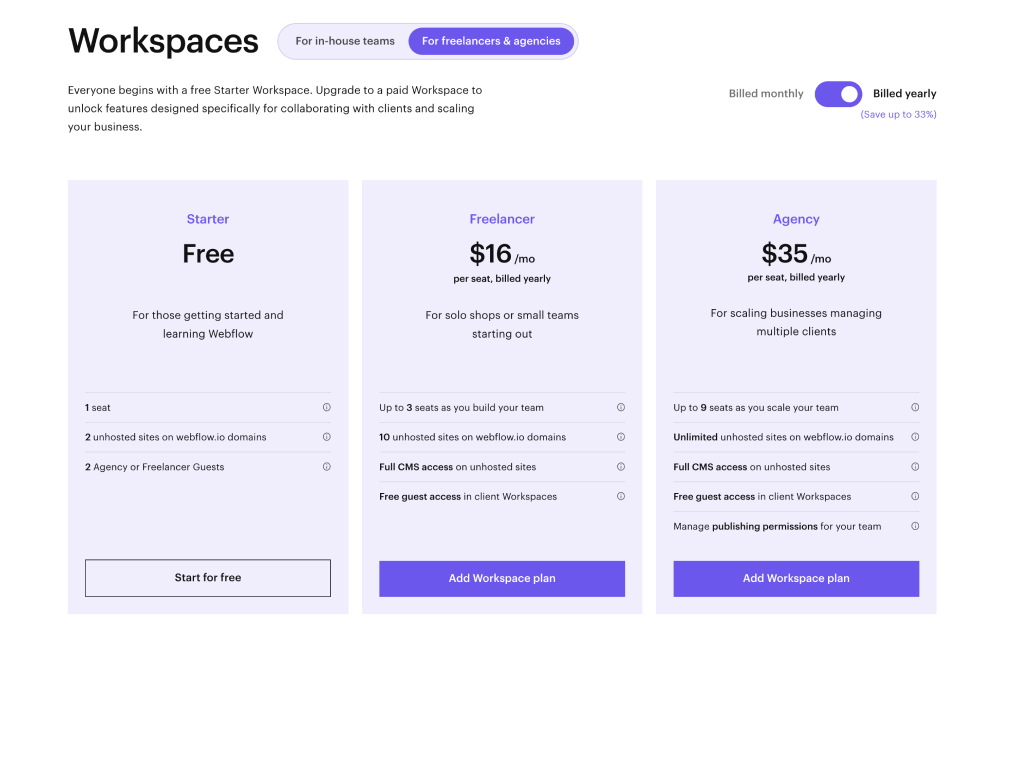
The “freelancer & agencies” workspace plans are ideal for, well, freelancers or agencies. The critical difference between “in-house” and “freelancer & agencies” is that one offers more support for unhosted housing of sites, while the other is for a single business that owns many different sites with an independent team or connections. Let’s explore the few differences between these two workspaces:
Starter ($0):
Like the workplace starter plan, the freelancer starter plan is the same. This plan is included with everyone’s Webflow account and is free forever, so you do not need to sign-up or worry about a free trial running out of time.
Freelancer ($24 monthly or $192 yearly):
The “freelancer” plan is ideal for any Webflow designer or developer who works with multiple clients at a time and needs more features from Webflow. Similar to the “core” workspace plan, the “freelancer” plan includes ten unhosted (webflow.io domains) sites, full CMS access for all of your site designs, and free access for unlimited guests. Overall, this plan is excellent for any solopreneur who wants to keep all client projects within one account.
Agency ($42 monthly or $420 yearly):
The most significant difference between the “freelancer” and “agency” plans is access to unlimited unhosted (webflow.io domains) sites rather than only ten sites. Also, with the “agency” plan, teams have access to remove Webflow’s branding/ badge from their unhosted; this can help when presenting or testing designs with clients. Other than these items, there is not much of a difference between the “agency” and “freelancer” plans.
Webflow Site Plans (Website Plans)
The primary purpose of Webflow's site plans is to enable you to connect the Webflow site design you built to a custom domain. A site plan is also necessary to enable eCommerce functionality. Although, you do not need a site plan to publish your site to Webflow's domain (domain.webflow.io). Every site plan Webflow offers includes the following:
Quick design & development tools
Access to interaction/ animation tools
Easy-to-use SEO capabilities
Backups and version control
Mobile optimization design tools
Basic security protection
Selecting a specific Webflow site plan based on your website needs can become challenging. Therefore, plans are divided into “general” and “eCommerce;” let’s explore the details.
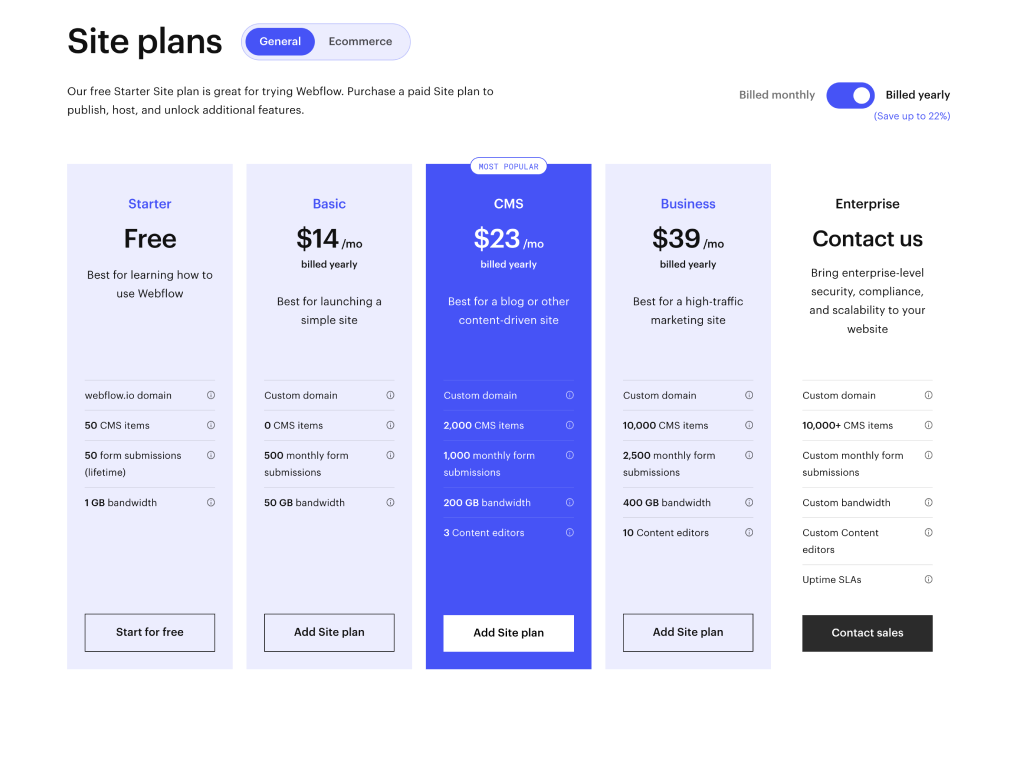
Webflow's general site plans are for any website (portfolio, content creation, events, memberships, etc.) that does not require eCommerce functionality, like check-out, order processing, and payment collection. A point of clarity, however, is that any of the “general” or “eCommerce” website plans only work for one hosted website. You’ll want to reference the Workspace details above if you have more than one site.
Listed below are the five different types of “general” Webflow site plans:
Starter ($0):
Exactly like the Workplace Starter Plan we discussed above, the starter plan for your Webflow site is the same. Whenever you sign up to create a new account or Website site, you are given access to this “starter” plan. Capturing free access to Webflow’s designer is a great way to view the tools Webflow has to offer before considering reaching out to an expert or designing the content yourself.
Basic ($18 monthly or $168 yearly):
The “basic” general website plan includes one custom domain, 500 monthly form submissions, 100 pages, and 250k monthly site visits. This plan is ideal for anyone hosting a website like a portfolio or series of static landing pages.
CMS ($29 monthly or $276 yearly):
The “CMS” website plan is one of Webflow’s most popular plans for one specific reason; access to Webflow’s built-in Content Management System (CMS). A “CMS” site plan is an excellent option for blogs, agencies, or other content-driven sites. The “CMS” plan includes 2,000 CMS items, scheduled publishing, 1000 form submissions, and the ability to invite three content editors. Overall, this site plan is perfect for most sites that need a built-in CMS.
Business ($49 monthly or $468 yearly):
Webflow’s “business” plan includes up to 10k CMS items, 300k monthly site visits, 10 content editors, and 2,500 monthly form submissions. The “business” plan is primarily for website owners who gather more traffic or form leads than the CMS plan will collect. Due to the increased price of this package, you should only consider joining this plan if you know that your site already takes full advantage of all the tools Webflow’s CMS plan offers.
Enterprise (contact only):
The last “general” site plan option is Webflow’s enterprise package. To make a technical story short, this package is ideal for businesses that need to max out everything offered within Webflow’s business plan, as access to Webflow’s enterprise option includes everything noted above and more.
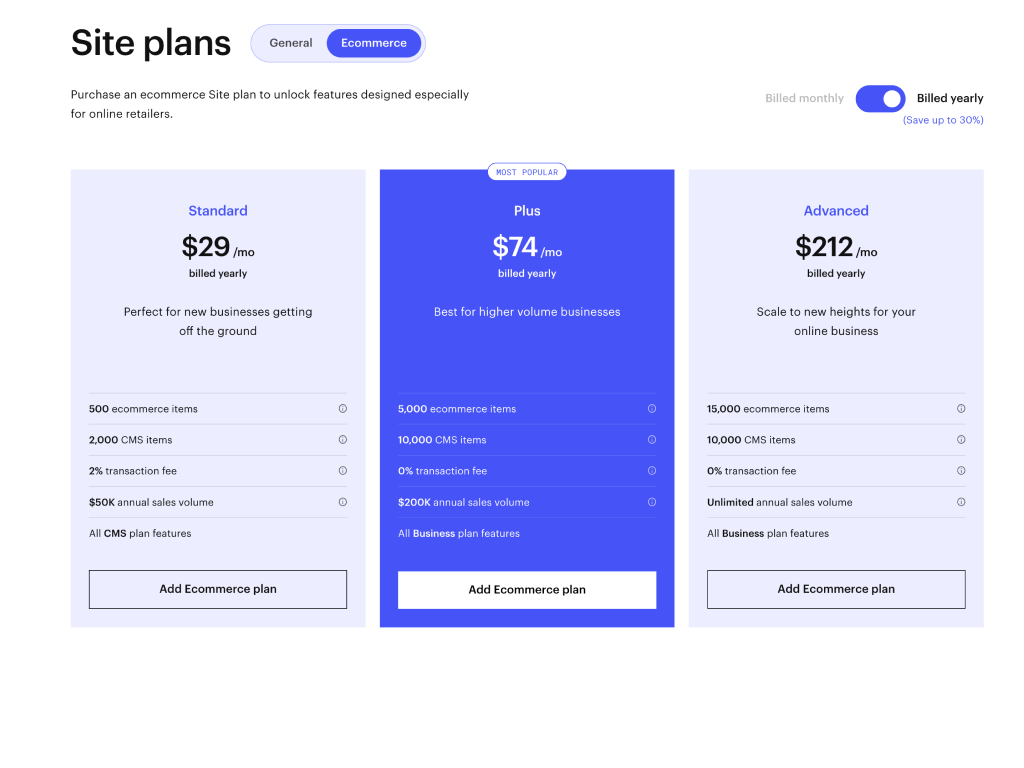
If you're building an eCommerce website on Webflow, you or your team will need access to several essential features that are not incorporated with the “general” site plans Webflow offers. To start, eCommerce plans include built-in (and customizable) functionality like shopping carts, checkout pages, and authorization to collect payments through Webflow. Listed below are a few items that are included in Webflow’s eCommerce plans that are not included in Webflow’s general plans:
Receipt automation and customization
Access to Webflow’s CMS (without the need to purchase another plan)
Custom shopping cart and check page creation
Collection of funds; through PayPal and Stripe
Facebook and Instagram integration
Custom code integration
Staff accounts
February 7th update: Webflow removed all sales limits, or gross merchandise value (GMV) limits, from all eCommerce Site plans! That means unlimited sales regardless of the plan you select below.
Now, let’s cover the details of each plan:
Standard ($42 monthly or $348 yearly):
The “standard” eCommerce plan allows you to use all of Webflow’s CMS and eCommerce tools to start selling on your website! This package is exemplary for any business owner who wants to start using Webflow and sell without the need to hire an expert. However, if you are a new business, you should note that the “standard” eCommerce plan includes a 2% transaction fee on top of Stripe's and PayPal's fees, which Webflow requires you to connect to complete sales. Be mindful of this when planning costs.
Plus ($84 monthly or $888 yearly):
Webflow’s “plus” eCommerce plan includes everything the “standard” plan offerings but takes it up a notch with access to 10k CMS items, 5k eCommerce items, and 10 staff accounts. The one significant detail you should consider between these two plans is that the “plus” plan includes a 0% transaction fee on top of Stripe's and PayPal's fees rather than 2% with the “standard” plan. Therefore, some business owners might want to consider justifying the higher monthly cost to remove Webflow’s 2% transaction fee.
Advanced ($235 monthly or $2544 yearly)
If your business is achieving over $200k in yearly sales volume through Webflow and you want to scale higher, the “advanced” Webflow plan is perfect for your team. With a simple upgrade to 15k eCommerce items this package is only for businesses that need un-capped sales or more eCommerce items. With a hefty price tag, it’s difficult to justify this site plan for any business doing less than $200k in yearly sales as you get access to all of Webflow’s powerful tools within the “plus” eCommerce plan.
So much to review! Which plan is right for you?
We just covered a bunch of details about Webflow’s offerings, so you might be ready to make your next move! However, if you still need a bit of guidance, check out our thoughts on selecting the right Webflow plan:
Which “Workspaces” account plan is right for me?
If you host an internal team, own one business with many brands:
The Starter plan is for you if you (or your team) want to test Webflow’s tools for an internal or client project without spending any money upfront. However, you will not be able to export your site’s code or transfer the site to your client with this plan.
The Core plan is for you if you need access to more than two unhosted Webflow site designs or want to offer more flexibility for your clients.
The Growth plan is for you if you want to host many client projects or offer more of a “white-glove” service for your clients.
The Enterprise plan is for you if you’ve outgrown all of the offerings within the “Growth” plan and need access to more of Webflow’s tools.
If you are a freelancer or agency:
The Starter plan is for you if you want to start a client project or learn Webflow without spending a dime.
The Freelancer plan is for you if you currently have more than one client and need access to more of Webflow’s tools to serve your clients best.
The Agency plan is for you or your business if you need access to an unlimited about of sites for your clients.
Which “General” site plan is right for me?
The Starter plan is right for you if you’re unsure about using Webflow to build or design your website; with this plan, you can try and test Webflow for free!
The Basic plan is excellent for portfolios or businesses that mainly host static pages and do not need access to Webflow’s CMS.
The CMS plan is for you if you host a content-driven site or plan to host content on your site in the future.
The Business plan is for you if your business outperforms Webflow’s allowed maximum CMS traffic visits and form collections.
The Enterprise plan is for you if the above plans no longer satisfy your online needs.
Which “eCommerce” site plan is right for me?
The Standard eCommerce plan is right for your business if you are just getting started and want to get your shop up and running using Webflow quickly.
The Plus eCommerce plan is for you if you use Webflow’s eCommerce tools but need access to a 0% transaction fee or more CMS/ eCommerce items.
The Advanced eCommerce plan is for you if you have achieved over $200k in yearly sales volume through Webflow and want to scale higher.
If Webflow updates its pricing, we will update this blog with the correct information. Be sure to bookmark this page for later reference!
Thank you for reviewing our insights about Webflow’s 2023 platform pricing! If you need help selecting your Webflow plan, contact us here. We're happy to help at no charge to you!