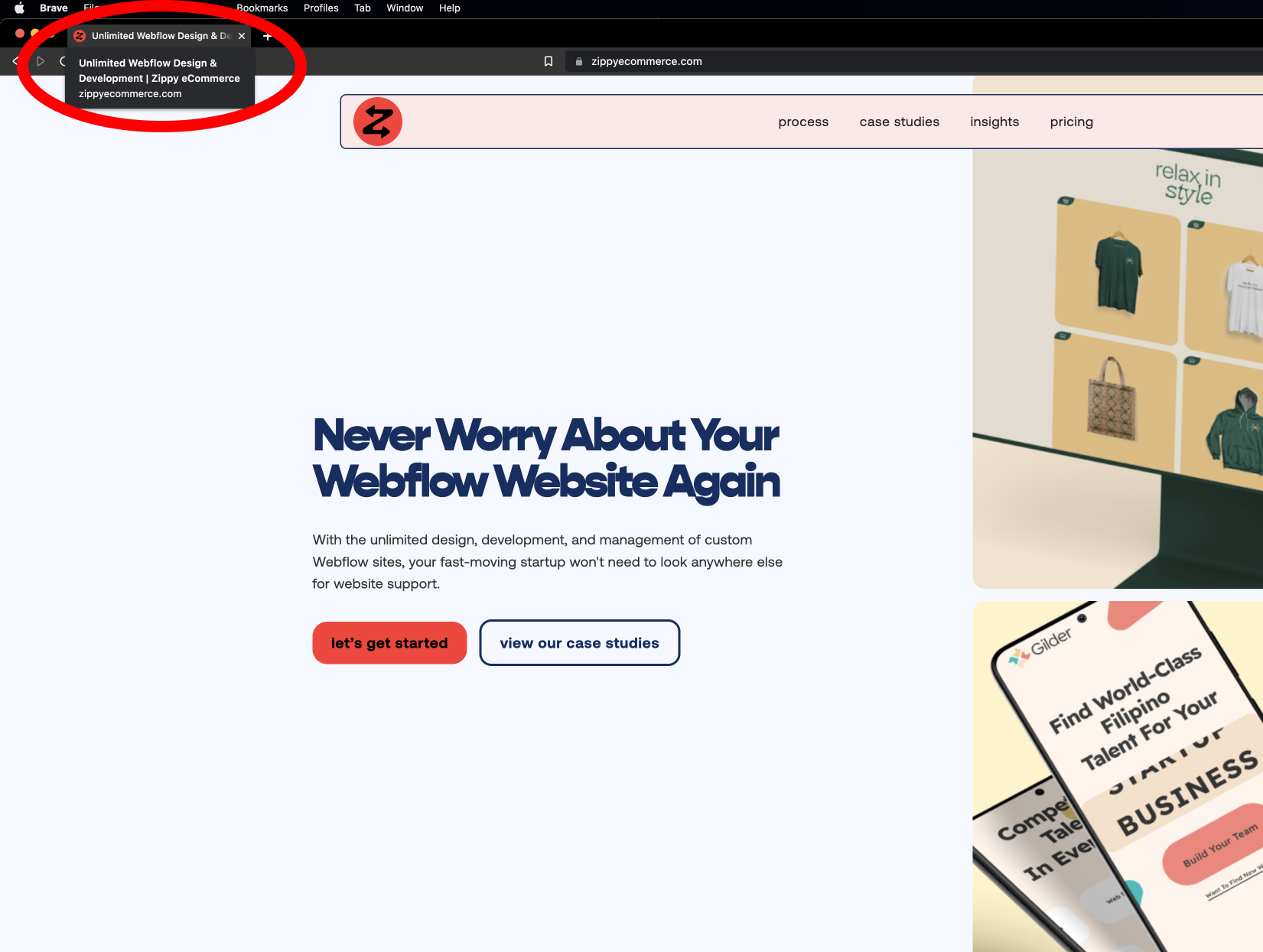
A website title or title tag refers to the tab heading that appears in multiple places across the internet. A website title identifies what the web page is about for both web users and search engines.
What is a Website Title?
A website title or title tag refers to the tab heading that appears in multiple places across the internet. A website title identifies what the web page is about for both web users and search engines. The optimal title length is approximately 55 characters (including spaces). Website titles can differ per page to showcase the correct information to users.
Editing your website title is simple, depending on your website developer or hosting platform. In Webflow, login to the designer of your selected site, navigate to pages (keyboard shortcut “P”) and hover over the page you want to edit. Next, select the gear icon on the far right, and scroll until you see “Title Tag.” Enter your information and publish your site to see the change!
PRO TIP: Ensure that the content or text within your title tag matches one or more keywords on your webpage to create a better SEO outcome.
What else can you do to improve your SEO? Below is a five simple step tutorial to walk you through improving your SEO right now.
Step 1: Find ideal keywords for your website
Step 2: Match webpage content and keywords
Step 3: Audit and update all title tags (above walkthrough)
Step 4: Add a Meta Description to all of your pages
Step 5: Update Open & Featured Image URLs
BONUS: Use search engine tools to boost your results
Let’s dive deeper into each step!
Step 1: Finding Ideal Keywords For Your Website
Searching for keywords should be manageable if the site owner has already created direct copywriting for their website. Many modern search engines use your site's content to justify the search results presented to users, so it's essential to align the website's text with keywords in your descriptions. We can break down keyword research into a few simple items:
List 10-20 seed keywords. A seed keyword is a broad keyword that relates to your niche.
When choosing seed keywords, you should look for words with search demand and business potential, match the searcher's intent (buy, learn, or compare something), and how much activity is centered around that keyword.
Review related search terms. When you type in your phrase and scroll to the bottom of Google's results, you'll notice some suggestions for searches related to your original input. These keywords can spark ideas for other keywords you may want to consider.
Step 2: Match webpage content and keywords
Now that we have relevant critical keywords for your business niche, you or your team members should audit your site’s copywriting content to optimize the copy for the keywords found. This process will allow you to better position your messaging to align with a customer search journey. And improve your rankings on search engines.
Step 3: Audit and update all title tags
As mentioned at the start of this blog, you’ll want to edit all the title tags throughout your website. It’s a best practice to ensure that all of your titles are unique to the page’s content. For example, if you have a page about building a skateboard, that title will differ from your product page title.
Step 4: Add a Meta Description to all of your pages
Similar to the title tags, meta description act as a page's definition for search engines. However, a meta description is only sometimes used in results. Sometimes Google shows a text snippet from the site page that contains the search term someone typed into Google. For example, if you type in "Webflow meta description" to Google, you'll see a search result about an article with the words "meta description" in the description.
It's worth noting that there's no character length limit here, but search engines will truncate long titles and descriptions. So it's a best practice to resist the urge to cram these fields with keywords to try and rig search results. Google ignores (and in some cases penalizes) deceptive practices.
Step 5: Update Open & Featured Image URLs
Open Graph (OG) is a technology that social networks like Facebook, LinkedIn, Twitter, Pinterest, etc., use to pull data from your site when you add a URL of your site in any of your posts on these services. For example, if you share a link to your homepage on your Facebook, an automatic image will populate to showcase to users.
Site owners must ensure the page has an Open Graph or featured image attached to each page. If someone searches for your site but happens to look for pictures instead of just results, they will be able to find your content. If a featured image is not attached to the link, you risk the chance of now showing up on an image search.
BONUS: Use search engine tools to boost your results
Using tools like Google Analytics and Google Search Console will distally help you audit and optimize your site’s content for the results you hope to achieve. Google verification allows you to verify domain ownership using the Google Search Console tools. These tools give you access to search data and enable you to submit your sitemap so your site is indexed in search results.
Let's recap the five steps to improving your site's SEO:
Step 1: Find ideal keywords for your website
Look for words with search demand and business potential, match the searcher's intent
Step 2: Match webpage content and keywords
Audit your site's copywriting content to optimize the copy for the keywords found
Step 3: Audit and update all title tags
Ensure that all of your titles are unique to the page's content
Step 4: Add a Meta Description to all of your pages
Google shows a text snippet from the site page that contains the search term someone typed into Google.
Step 5: Update Open & Featured Image URLs
If someone searches for your site but happens to look for images instead of just results, they will be able to find your content.
BONUS: Use search engine tools to boost your results
Use tools like Google Analytics and Google Search Console
Thank you for taking a moment to review our insights on improving your site's SEO! We hope that you have found this information helpful.
We would also like to thank Webflow and Ahrefs for content provided in this blog. We have linked their articles below if you want to continue to explore!